I trained my model. Ran cross-validation. Everything looked perfect.
Metrics were screaming, “Deploy me.”
Then it hit production — and failed miserably.
The worst part? It wasn’t the algorithm. It was my preprocessing. The steps I thought were harmless had quietly leaked information from the future into the training set. By the time I noticed, the damage was already done.
What Data Leakage Actually Is
Leakage isn’t exotic. It’s when your model learns from information it would never have in the real world.
Your cross-validation says 95% accuracy. Production says 60%. That gap? Often, it’s leakage.
It happens when preprocessing steps expose your model to information it wouldn’t have at prediction time. If your pipeline touches the test set before it should, your evaluation isn’t real — it’s fiction dressed up as success.
Here’s a concrete example:
You’re building a fraud detection model with 100,000 transactions. You calculate the “average transaction amount per user” across the entire dataset, then split into train/test.
Seems innocent, right?
Wrong. Your test set transactions just influenced the average that your training set learned from. The model now “knows” something about the future it’s supposed to predict.
The 4 Preprocessing Mistakes That Cause Leakage
1. Scaling Before Train/Test Split
I was building a customer churn model for a SaaS company. Features included “days since last login,” “total revenue,” and “support tickets opened.”
I normalized everything using StandardScaler first, then split the data. My validation accuracy hit 91%.
In production? 68%.
What happened? The scaler learned the mean and standard deviation from the entire dataset — including the test set. The model had already peeked at the future.
The mistake:
from sklearn.preprocessing import StandardScaler
from sklearn.model_selection import train_test_split

# WRONG: Scaler learns statistics from ALL data (including test)
scaler = StandardScaler()
X_scaled = scaler.fit_transform(X)
X_train, X_test, y_train, y_test = train_test_split(X_scaled, y, test_size=0.2)
The fix:
# Split first — test set remains untouched
X_train, X_test, y_train, y_test = train_test_split(X, y, test_size=0.2, random_state=42)

# Fit scaler ONLY on training data
scaler = StandardScaler()
X_train_scaled = scaler.fit_transform(X_train)

# Apply the same transformation to test data
X_test_scaled = scaler.transform(X_test)
Notice: fit_transform() on train, transform() on test. Never the other way around.
2. Filling Missing Values Before Split
I was working on a healthcare model predicting hospital readmission. The dataset had missing values in “age” and “blood_pressure” fields.
I filled the missing values with the dataset mean, then split into train/test.
My F1-score was 0.84. In production? 0.71.
The problem? The mean I used to fill missing values was calculated from the entire dataset, including the test set. The training data now contained information it shouldn’t have.
The mistake:
# WRONG: Impute using statistics from entire dataset
df['age'].fillna(df['age'].mean(), inplace=True)
df['blood_pressure'].fillna(df['blood_pressure'].mean(), inplace=True)

# Then split
X_train, X_test, y_train, y_test = train_test_split(df, y, test_size=0.2)
The fix:
# Split first
X_train, X_test, y_train, y_test = train_test_split(X, y, test_size=0.2, random_state=42)

# Calculate statistics ONLY from training data
train_age_mean = X_train['age'].mean()
train_bp_mean = X_train['blood_pressure'].mean()

# Apply to both sets
X_train['age'].fillna(train_age_mean, inplace=True)
X_train['blood_pressure'].fillna(train_bp_mean, inplace=True)

X_test['age'].fillna(train_age_mean, inplace=True)
X_test['blood_pressure'].fillna(train_bp_mean, inplace=True)
The test set never influences the imputation statistics.
3. Target-Based Feature Engineering
I built a credit default model and created a feature called “default_rate_by_zip_code” — the percentage of loans that defaulted in each zip code.
My F1-score jumped from 0.67 to 0.89 overnight. I felt brilliant.
Then I realized: I’d calculated the rate using the entire dataset, including the test loans I was supposed to predict. The model wasn’t learning patterns — it was memorizing answers.
The mistake:
# WRONG: Target leakage through encoding
df['default_rate_by_zip'] = df.groupby('zip_code')['defaulted'].transform('mean')

# Then split
X_train, X_test, y_train, y_test = train_test_split(
    df.drop('defaulted', axis=1),
    df['defaulted'],
    test_size=0.2
)
The test set’s target values had already leaked into the feature.
The fix:
# Split first
X_train, X_test, y_train, y_test = train_test_split(X, y, test_size=0.2, random_state=42)

# Calculate encoding ONLY on training data
train_data = X_train.copy()
train_data['target'] = y_train
default_rates = train_data.groupby('zip_code')['target'].mean()

# Global mean for unseen zip codes
global_mean = y_train.mean()

# Apply to both sets
X_train['default_rate_by_zip'] = X_train['zip_code'].map(default_rates).fillna(global_mean)
X_test['default_rate_by_zip'] = X_test['zip_code'].map(default_rates).fillna(global_mean)
Note the fillna(global_mean) — this handles zip codes that appear in test but not in training.
4. Time-Series Aggregations Using Future Data
I was predicting next-day stock returns. I created a feature: “7-day rolling average price.”
But I calculated it across the entire dataset before splitting by date.
The problem? Rows in my training set had rolling averages that included data from future dates. The model was seeing the future.
The mistake:
# WRONG: Calculate rolling features on full dataset
df['rolling_avg_7d'] = df['price'].rolling(window=7).mean()

# Then split by date
train = df[df['date'] < '2024-01-01']
test = df[df['date'] >= '2024-01-01']
For a row on December 28, 2023, the rolling average included prices from January 2024.
The fix:
# Split by date FIRST
train = df[df['date'] < '2024-01-01'].copy()
test = df[df['date'] >= '2024-01-01'].copy()

# Calculate rolling features separately
train['rolling_avg_7d'] = train['price'].rolling(window=7).mean()
test['rolling_avg_7d'] = test['price'].rolling(window=7).mean()
Answer a question: “Could this have been computed at the moment of prediction?” If not, it’s leakage.
Note: The first few rows will have NaN values (not enough history). Handle these by forward-filling, dropping, or using a smaller window.
The mistake:
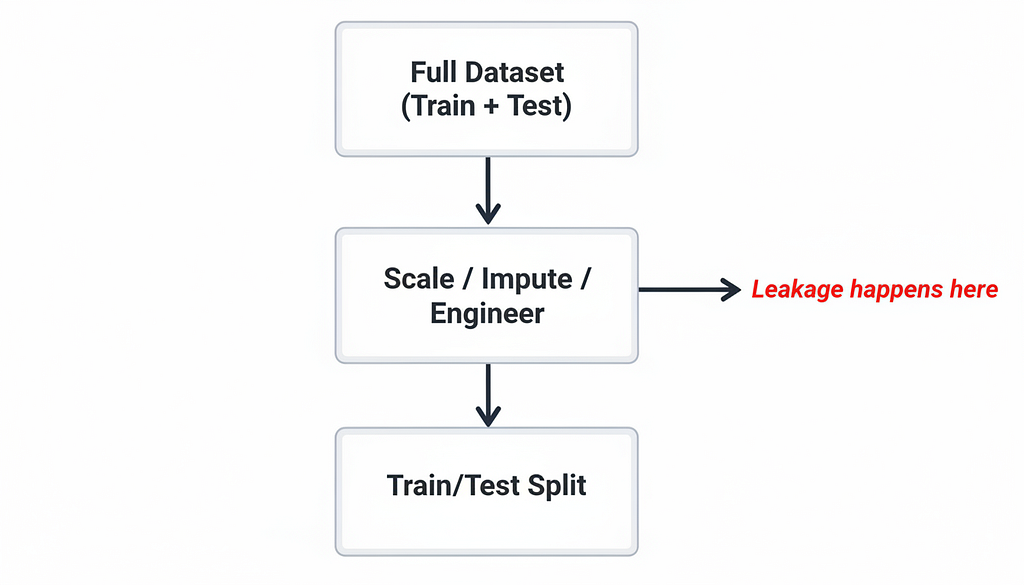
Wrong Pipeline
The correct mechanism:
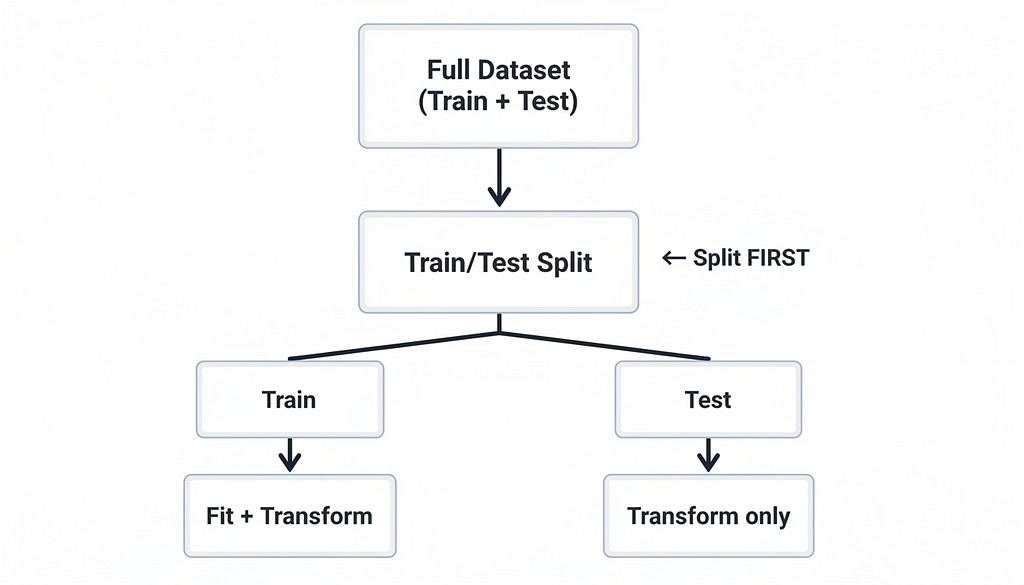
Right Pipeline
Why Leakage Is So Hard to Detect
Leakage doesn’t crash your code. It rewards you.
Validation metrics look perfect. Cross-validation says everything is fine. You feel justified — until production proves otherwise.
It hides in preprocessing pipelines, feature engineering, and statistics you assumed were safe.
I once spent two weeks optimizing hyperparameters on a model with leakage. Every experiment showed improvement. The model worked beautifully on historical data.
In production? 53% accuracy. A coin flip would’ve been 50%. Tw weeks wasted on a model that barely beat random guessing.
You trust your pipeline. It betrays you.
How to Protect Yourself
Split first, preprocess later.
Never touch test data prematurely. This is the iron rule. Every statistic, every transformation, every feature — all must be calculated after the split.
Treat preprocessing as part of the model.
The steps you take during training must exactly match what happens in production. If you can’t reproduce the exact same transformations at inference time, you have leakage.
Think backward from inference.
Ask: “Could the model have access to this information at prediction time?” If not, don’t use it. This mental check catches most leakage before it happens.
Audit your features.
Before you train, look at every feature and ask: “Does this leak the future?” A 30-second reflection can save weeks of debugging.
Use pipelines to enforce structure.
Scikit-learn’s Pipeline forces you to do things correctly:
from sklearn.pipeline import Pipeline
from sklearn.preprocessing import StandardScaler
from sklearn.ensemble import RandomForestClassifier

# This prevents leakage by design
pipeline = Pipeline([
    ('scaler', StandardScaler()),
    ('classifier', RandomForestClassifier())
])

# Everything fits together on training data
pipeline.fit(X_train, y_train)

# Prediction applies same transformations
predictions = pipeline.predict(X_test)
The scaler and model are fitted together, only on training data. The pipeline ensures the test set never influences training.
Important caveat: Pipelines prevent leakage in transformations, but if you do feature engineering before the pipeline (like target encoding), leakage can still happen. Be vigilant.
Watch out for cross-validation leakage.
Even cross_val_score won’t save you if you scaled or engineered features before calling it. The function can’t undo preprocessing that already happened. Always use pipelines with cross-validation, or ensure preprocessing happens inside each fold.
The Hard Truth
Preprocessing isn’t just about cleaning or shaping data.
It’s about trust — trusting that your model sees only what it would see in the real world.
If your preprocessing exposes information it shouldn’t, no amount of hyperparameter tuning or fancy algorithms will fix your model. What looks like “high-performing” was fiction all along.
Leakage doesn’t break your model. It rewards you with perfect metrics — until production proves you were training on a lie.
I learned this the expensive way. You don’t have to.
One Final Check Before You Deploy
Run your model on truly unseen data — data collected after your training set. Not a random split. Not cross-validation. New data.
If metrics drop sharply, you have leakage.
Find it. Fix it. Because the only thing worse than a model that fails in development is one that fails in production — after you’ve already shipped it.
Visual: Time-Series Split (The Right Way)
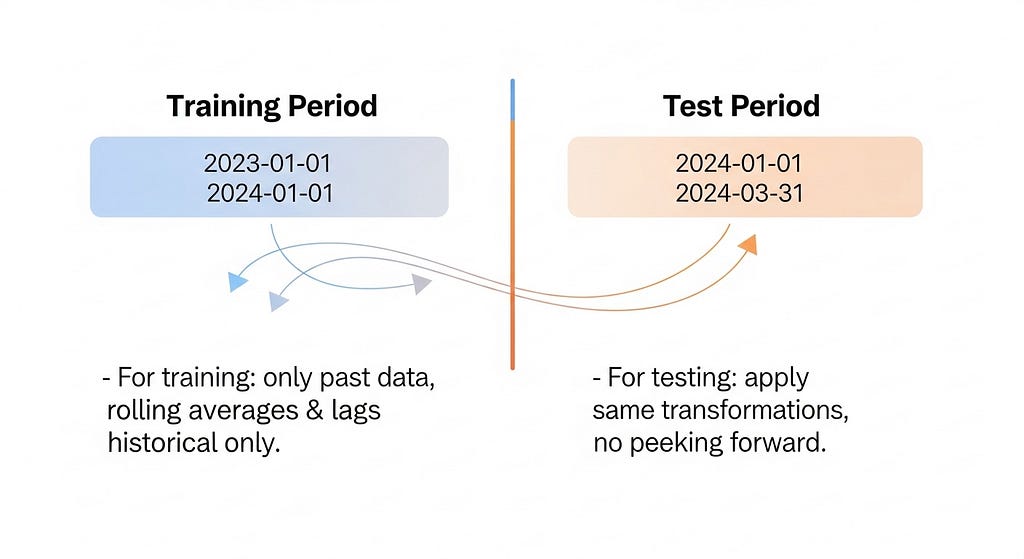
Time-Series Split
First published on Medium ↗.