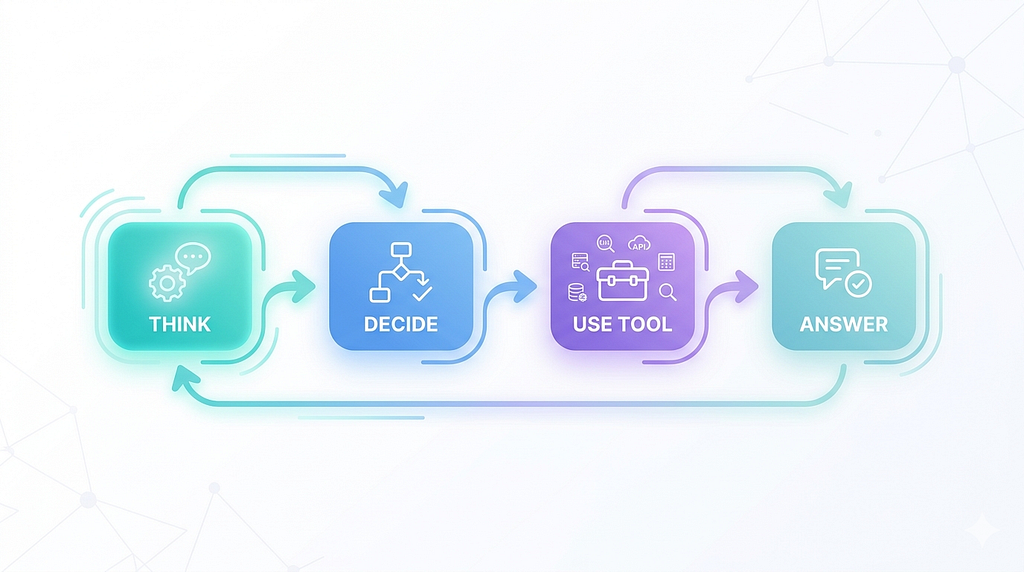
A simple loop behind most working AI agents
Most first AI agents don’t fail because of the model.
They fail because the behavior isn’t clear.
So instead of building something abstract, build something real:
an AI agent that reads questions, uses tools when needed, and returns answers.
This is the same setup I used to complete the Hugging Face Agents course and earn the completion certificate.
Step 1: Define What the Agent Should Do
Keep it simple:
- read a question
- decide if it needs a tool
- use the tool
- return the answer
That’s the entire system:
understand → decide → act → repeat → stop
Everything you build supports this loop.
Step 2: Add Tools (This Shapes Behavior)
Start with just a couple of tools.
Calculator
from langchain_core.tools import tool
from simpleeval import simple_eval

@tool
def calculator(expr: str) -> str:
    """Use this tool for ANY arithmetic or numeric computation."""
    return str(simple_eval(expr))
Web Search
from ddgs import DDGS

@tool
def web_search(query: str) -> str:
    """Search the web for recent or unknown information."""
    with DDGS() as ddgs:
        results = list(ddgs.text(query, max_results=3))
    return "\n".join([r["body"] for r in results])
Why This Matters
The LLM doesn’t read your function logic.
It reads your docstrings. That’s how it understands what each tool is for and when to use it.
Clear docstrings = better decisions.
What Else You Can Add
Once this works, you can extend with:
- Wikipedia search (for structured knowledge)
- page fetch (for extracting full content from a URL)
You don’t need everything at the start. Two or three well-defined tools are enough.
Step 3: Define the Agent Behavior (Prompt)
This is where you guide decisions.
SYSTEM_PROMPT = """
You are a multi-step research agent.
Process:
1. Decide if a tool is needed
2. If yes, call the most relevant tool
3. Use the result to move closer to the answer
4. Stop as soon as you have enough information
"""
That last line matters more than it looks. Without it, agents keep calling tools looking for a more complete answer. This gives them permission to stop.
Step 4: Set Up the Model and State
Before the brain runs, two things need to exist: the model and a way to track the conversation.
from pydantic import BaseModel
from langgraph.graph.message import add_messages
from langchain_core.messages import BaseMessage
from langchain_openai import ChatOpenAI
from typing import Annotated

class AgentState(BaseModel):
    messages: Annotated[list[BaseMessage], add_messages]
    steps: int = 0
    model_config = {"arbitrary_types_allowed": True}

model = ChatOpenAI(
    model="gpt-4o-mini",
    temperature=0.3,
    max_tokens=1024,
)
AgentState holds everything the agent knows at any point — the message history and how many steps it’s taken. Every node in the graph reads from and writes back to this.
temperature=0.3 keeps the model focused. Higher values make it more creative — not ideal when deciding which tool to call.
Step 5: Build the Agent “Brain”
This is where the model runs.
from langchain_core.messages import SystemMessage

def agent_node(state):
    messages = state["messages"]
    if not any(isinstance(m, SystemMessage) for m in messages):
        messages = [SystemMessage(content=SYSTEM_PROMPT)] + messages
    response = model_with_tools.invoke(messages)
    return {
        "messages": [response],
        "steps": state.get("steps", 0) + 1
    }
This is the decision-making step.
Step 6: Limit the Agent
Keep it controlled.
MAX_STEPS = 7

if steps >= MAX_STEPS:
    return {
        "messages": [
            AIMessage(content="Provide your best possible final answer based on current information.")
        ],
        "steps": steps
    }
Without a hard limit, a confused agent keeps calling tools going nowhere. Seven steps is enough for basic tasks. If it hasn’t found an answer by then, the problem is in the prompt or the tools — not the step count.
Step 7: Build the Loop
Using LangGraph:
from langgraph.graph import StateGraph, START
from langgraph.prebuilt import ToolNode, tools_condition

builder = StateGraph(AgentState)
builder.add_node("assistant", agent_node)
builder.add_node("tools", ToolNode([calculator, web_search]))
builder.add_edge(START, "assistant")
builder.add_conditional_edges("assistant", tools_condition)
builder.add_edge("tools", "assistant")
agent = builder.compile()
The flow: think → tool → think → answer
Step 8: Run It
from langchain_core.messages import HumanMessage

response = agent.invoke({
    "messages": [HumanMessage(content="What is 25 * 4?")]
})
print(response["messages"][-1].content)
That’s your working agent.
What Makes This Work
- tools have clear roles
- docstrings guide usage
- the loop allows iteration
- limits keep it stable
That’s all you need for a solid first agent.
Full Code
This is the minimal version.
The full implementation — with more tools, improved state handling, and the complete pipeline I used to earn the Hugging Face Agents course certificate — is here:
https://github.com/hexa01/simple-ai-agent
Final Thought
Your first AI agent doesn’t need to be complex.
It needs to be clear.
Clear tools. Clear decisions. Clear stopping point.
That’s what makes it work.
First published on Medium ↗.